ClipDot - Polished Product Videos for macOS
ClipDot is a native macOS screen recorder and lightweight editor for creating polished product videos with automatic zooms, cursor cleanup, frame styling, background audio, and MP4 export.
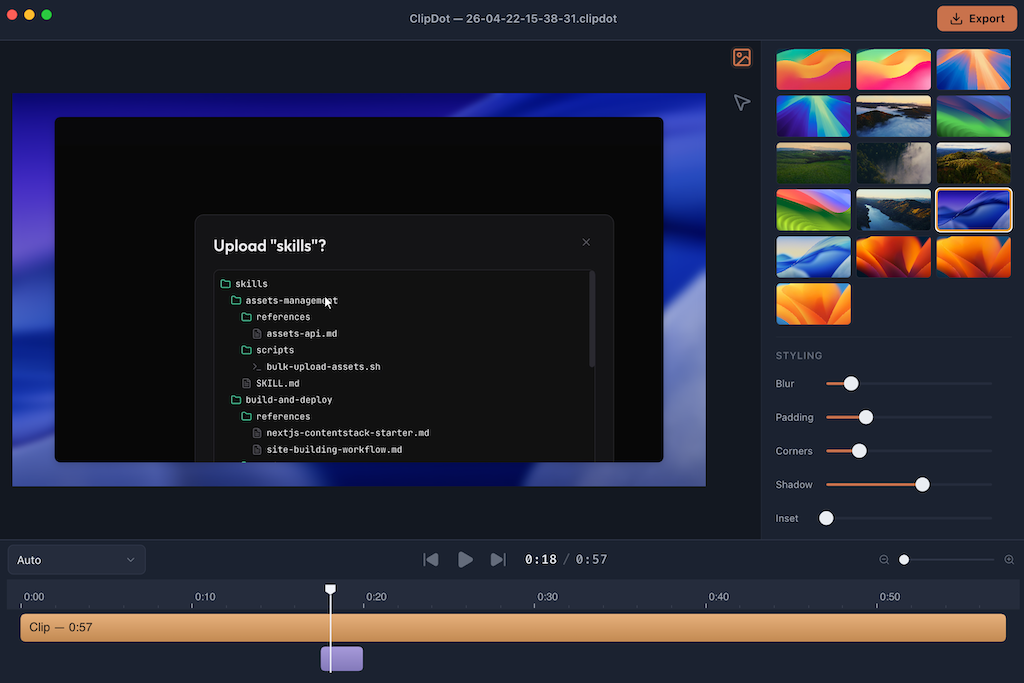
ClipDot - Polished Product Videos Without a Full Video Editor
ClipDot is a native macOS screen recorder and lightweight editor built for people who need to create polished product videos quickly. It records your display, a window, or a selected area, then turns the rough capture into an editable timeline where you can clean up the cursor, add zooms, frame the recording with bundled background wallpapers, include background audio, and export a finished MP4.
The goal is simple: make product video creation feel closer to editing a screenshot than opening a full video editor. You should be able to record a flow, tighten the presentation, and export something ready to share without moving the clip through a complicated production pipeline.
Why I Built ClipDot
ClipDot started with a problem I kept running into while building and shipping products: recording the screen is easy, but making the recording look good takes too much work. A raw capture often has awkward cursor movement, tiny UI details, dead space around the app, and no visual framing. Fixing those issues usually means opening a heavy editor for what should be a quick product demo.
The second problem was focus. Product videos need to guide attention. If a viewer cannot see what changed, where the cursor moved, or which control matters, the recording becomes harder to follow than the product itself. I wanted zooms and cursor treatment to be part of the normal recording workflow instead of a manual editing chore.
The last piece was speed. A lot of product clips are not full marketing videos. They are release notes, launch posts, support replies, internal demos, landing page assets, and short walkthroughs. Those clips still need to look clean, but they should not require a full editing session every time.
How It Works
ClipDot combines native macOS recording with a focused post-capture editor. The normal flow looks like this:
- Choose whether to record the full display, a window, or a selected area.
- Record the product flow using the native macOS permission and capture system.
- Review the generated timeline with automatic zoom blocks based on cursor intent.
- Adjust zooms, cursor behavior, frame styling, and optional background audio.
- Export the finished video as a local MP4 file.
Instead of treating the recording as a flat video file, ClipDot turns it into something structured. Cursor movement, clicks, zoom moments, framing, and audio are all editable parts of the final output, so you can polish the video without rebuilding it in a general-purpose editor.
Built for Product Demos
ClipDot is designed around the kind of videos software builders actually need to make.
If you are recording a new feature, the automatic zoom blocks help bring small UI details into focus. If the cursor movement is messy, ClipDot can smooth it so the final video feels deliberate. If the cursor sits still in the middle of the screen, it can be hidden while idle. If a click matters, click emphasis makes the action easier to follow.
The visual frame matters too. A raw screen recording can feel unfinished, especially when it is embedded in a website, changelog, social post, or product announcement. ClipDot lets you add bundled background wallpapers, padding, rounded corners, inset, blur, and shadows so the video feels like a designed asset instead of a raw capture.
That is the workflow I wanted most: record something real, clean up the parts that distract from the product, and export a polished clip without leaving the app.
Core Workflow
The day-to-day ClipDot workflow stays intentionally focused:
- Use display, window, or area recording depending on the product flow you want to capture.
- Let ClipDot detect cursor intent and create editable zoom blocks on the timeline.
- Smooth cursor motion, emphasize clicks, or hide the cursor when it is idle.
- Style the recording with bundled background wallpapers, padding, rounded corners, inset, blur, and shadows.
- Preview bundled background audio and choose whether to include it in the export.
- Export a styled MP4 locally when the clip is ready to share.
ClipDot also uses email OTP authentication for export access. The packaged release is built for Apple Silicon Macs, signed and notarized for distribution, and requires macOS 14 or later with Screen Recording and Accessibility permissions enabled at runtime.
Get Started
If you are still turning raw screen captures into product videos by dragging them into a full video editor, ClipDot gives you a faster workflow. Record the product, edit the moments that matter, style the frame, and export a clean MP4 without leaving the app.
ClipDot is built for product builders, indie hackers, designers, and teams who need polished product clips often enough that the editing workflow should be lightweight, repeatable, and fast.
ClipDot gives macOS users a focused way to record, polish, and export product videos, with automatic zooms, cursor cleanup, frame styling, and local MP4 export built into one lightweight workflow.
Key Features
Native Screen Recording
Record the full display, a single window, or a selected area using native macOS capture helpers.
Automatic Zoom Blocks
Detect cursor intent and turn important moments into editable zoom blocks directly on the timeline.
Cursor Cleanup
Smooth cursor movement, emphasize clicks, and hide the cursor when idle so recordings feel intentional.
Styled Video Frames
Add bundled background wallpapers, padding, rounded corners, inset, blur, and shadow controls without opening a full editor.
Background Audio
Preview and export optional looping background audio from bundled tracks for more polished product demos.
Local MP4 Export
Export finished videos as styled MP4 files locally from a signed and notarized Apple Silicon Mac app.
Ready to build something?
Explore the live demonstration or dive into the codebase to see how it's built.