Passbook - Encrypted Env Storage and Sync
Passbook is a fully encrypted SaaS and CLI for storing, syncing, and managing environment variables across projects, teams, and monorepos.
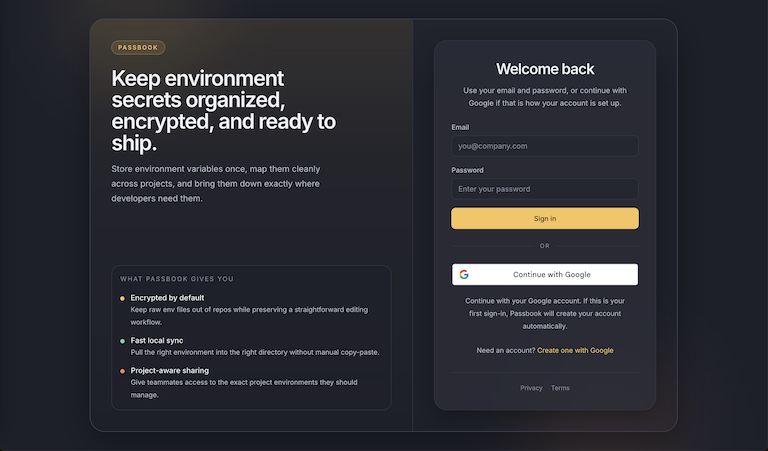
Passbook - Encrypted Env Storage and Sync for Developers
Passbook is a simple, fully encrypted SaaS built for developers and teams who need a reliable way to manage environment variables. It acts as a single source of truth for your secrets and pairs that with a fast CLI so syncing local .env files feels as natural as pulling the latest code.
Instead of sharing API keys over Slack, email, or screenshots, you store them in Passbook and sync them to your machine when you need them. The hosted service runs at passbook.prmworks.com, and the CLI is available on npm as @prmworks/passbook.
Why I Built Passbook
Passbook started with a problem I kept seeing on real projects: secrets were being passed around in places that were never meant to hold them. A quick message in chat might feel convenient, but it leaves sensitive values sitting in history forever and makes it hard to know which value is current.
The second problem was monorepos. A serious project can easily have five or ten different .env files spread across apps, workers, APIs, and internal tools. Updating them one by one is slow, repetitive, and easy to get wrong. I wanted a workflow where one command could bring everything up to date.
The last piece was developer experience. I wanted environment management to feel familiar, predictable, and fast. You make a change, you push it, and your teammates pull it. That Git-like mental model became the foundation for the product.
How It Works
Passbook combines a secure web app with a CLI designed for day-to-day development workflows. The normal first-time flow looks like this:
npm install -g @prmworks/passbook
passbook login
passbook project link
passbook env link
passbook pull
Here is what those commands do:
passbook loginauthenticates your local machine with your Passbook account.passbook project linkconnects the current repository to a Passbook project.passbook env linkmaps local.envfiles to environments stored in Passbook.passbook pullwrites the latest remote values into your linked local files.
If you are working in a larger repository, Passbook also supports syncing every mapped environment from the repo root:
passbook pullThat one command is the feature I wanted most. In a monorepo, it means you can update every linked service at once instead of bouncing between folders and repeating the same task over and over.
Built for Real Repo Workflows
The CLI is designed around the way developers actually move through a codebase.
If you run passbook pull or passbook push from the project root, Passbook can show you the linked environments and let you choose what to sync. If you are already deep inside a mapped directory like packages/api, the CLI is smart enough to understand that context and target the matching environment automatically.
Passbook also keeps the local mapping information in:
.passbook/config.jsonThat gives each repository a clear, portable record of which Passbook project it is linked to and which local files map to which remote environments.
CLI Workflow
Once a repository is linked, the day-to-day workflow stays intentionally simple:
- Use
passbook pullto bring remote environment values into your local files. - Use
passbook pushto send local changes back to Passbook. - Use
passbook pull --allorpassbook push --allfrom the repo root when you need to sync everything. - Use
passbook env listto inspect your current mappings. - Use interactive linking commands when setting up new repos or new environment files.
The goal is not to create another complicated secrets platform. The goal is to make secure env management feel lightweight enough that teams will actually use it every day.
Get Started
If your team is still sharing secrets through chat messages or manually copying .env files across services, Passbook gives you a cleaner workflow. Store everything in one place, link your repository once, and let the CLI handle the sync.
Visit passbook.prmworks.com to use the service, or install the CLI from npm:
npm install -g @prmworks/passbookPassbook gives developers a secure, Git-like workflow for environment variables, with first-class support for monorepos and fast local sync through a purpose-built CLI.
Key Features
Encrypted Secret Storage
Keep API keys and env vars in one secure place instead of sharing them through chat apps, email, or scattered docs.
Git-Like Team Workflow
Update variables with a push-style workflow and let teammates pull the latest changes when they need them.
Monorepo-Wide Sync
Run `passbook pull` from the project root to update every mapped env file across multiple apps and services.
Smart Directory Detection
Run commands inside a mapped module folder and the CLI can automatically target the correct environment.
Repo-Local Mapping
Store project and environment mappings in `.passbook/config.json` so each repository knows exactly what should sync.
Interactive CLI Experience
Developer-friendly prompts guide login, project linking, environment mapping, and overwrite confirmation without slowing you down.
Ready to build something?
Explore the live demonstration or dive into the codebase to see how it's built.