Seeker - Modern File Browser for Home Servers
A lightweight, Docker-based file management solution that brings an intuitive web interface to your home server for seamless file browsing and management.
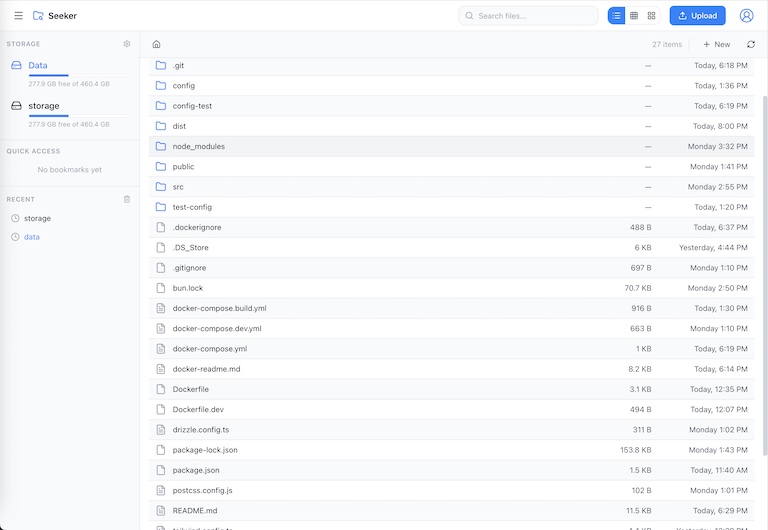
Seeker - Modern File Browser for Home Servers
Seeker is a lightweight, Docker-based file management solution that brings an intuitive web interface to your home server. Built for ease of use and cross-platform compatibility, it eliminates the need for SSH access and terminal commands while keeping resource usage minimal.
Why Use Seeker?
Managing files on a home server typically requires SSH access and command-line knowledge, making simple tasks unnecessarily complex. Seeker solves this by providing a modern, web-based file manager accessible from any device on your network. Whether you’re organizing media files, managing backups, or sharing documents with family, Seeker makes server file management as simple as using your desktop file explorer.
Key Features
- Web-Based Interface: Access your server files through any web browser on any device - desktop, tablet, or phone - without SSH or terminal commands.
- Comprehensive File Operations: Create, rename, move, copy, and delete files and directories with full drag-and-drop support for intuitive management.
- Advanced Search: Quickly locate files by name, type, or content across your entire file system without complex find commands.
- Multi-Device Upload/Download: Transfer files seamlessly between your server and any device with single or batch operations.
- User Authentication: Built-in role-based access control ensures only authorized users can access or modify files.
- Lightweight & Fast: Minimal resource usage (50-150MB RAM) makes it perfect for Raspberry Pi, old laptops, and resource-constrained servers.
- One-Command Deployment: Deploy with a single Docker command - works on Linux, Windows, macOS, and ARM-based systems.
How It Works
Seeker uses a simple deployment and usage process:
- Deploy with Docker: Run a single Docker command to pull and start Seeker, mounting your desired directory.
- Access the Interface: Open your browser and navigate to the configured port to see your file system.
- Manage Files: Browse directories, search for files, upload/download content, and perform operations through the intuitive interface.
- Multi-Device Access: Connect from any device on your network - phones, tablets, laptops - all see the same interface.
User Interface & Options
The application provides an intuitive interface where you can:
- Browse your entire file system with familiar folder navigation
- Upload files from any device via drag & drop or file picker
- Download individual files or entire directories as ZIP archives
- Search across all files and folders instantly
- Create new folders and organize content visually
- Move and copy files with drag-and-drop gestures
- Rename files and folders inline
- Delete unwanted files with confirmation prompts
- View file metadata (size, type, modified date)
- Access files from multiple authenticated users simultaneously
Deployment Options
Seeker offers flexible deployment methods:
Standard Docker Run:
docker run -d \
  --name seeker \
  -p 7335:3000 \
  -v ./config:/config \
  -v /path/to/your/files:/data \
  --restart unless-stopped \
  ipradeepmishra/seeker:latest
Docker Compose:
services:
  seeker:
    image: ipradeepmishra/seeker:latest
    container_name: seeker
    ports:
      - "7335:3000"
    volumes:
      - ./config:/config
      - /path/to/your/files:/data
    restart: unless-stopped
    environment:
      - UID=1000 # optional, user id default is 1000
      - GID=1000 # optional, group id default is 1000
Use Cases
Seeker excels in various home server scenarios:
- Media Server Management: Organize files for Plex, Jellyfin, or Emby without SSH access
- Backup Organization: Browse and restore specific files from backup archives
- Family File Sharing: Give family members easy access to shared folders from their devices
- Development Projects: Quick access to logs, configurations, and code repositories
- Document Management: Upload and organize documents from any device
- Photo Storage: Transfer photos from phones directly to server storage
Technical Details
- Packaged as a lightweight Docker container for universal compatibility
- Built with modern web technologies for responsive, fast performance
- WebSocket support for real-time updates across multiple clients
- Optimized for low resource consumption on home hardware
- Works on x86_64 and ARM architectures (Raspberry Pi compatible)
- Supports large file transfers with progress tracking
- Session-based authentication with configurable timeouts
Security & Privacy
Seeker prioritizes secure file management:
- User Authentication: Built-in login system prevents unauthorized access
- Role-Based Access: Configure different permission levels for users
- Network Isolation: Accessible only on your local network by default
- HTTPS Ready: Compatible with reverse proxies for encrypted connections
- Session Management: Automatic timeouts for inactive sessions
- No Data Collection: Your files and usage data remain completely private
Performance
Designed for efficiency on home server hardware:
- Memory: 50-150MB depending on activity level
- CPU: Minimal usage when idle, efficient processing during operations
- Transfer Speed: Limited only by your network and disk speed
- Concurrent Users: Supports multiple simultaneous connections
Platform Compatibility
Seeker works on any system that supports Docker:
- Linux distributions (Ubuntu, Debian, Fedora, Arch, etc.)
- Windows with Docker Desktop
- macOS with Docker Desktop
- Raspberry Pi (ARM-based systems)
- NAS devices with Docker support (Synology, QNAP, etc.)
- Cloud VPS instances
Get Started
You can start using Seeker immediately by pulling the Docker image from Docker Hub. Simply run the Docker command with your desired directory mount, open your browser to the configured port, and start managing your files through the web interface. No complex setup, no configuration files - just instant access to your server files from any device.
Seeker brings modern file management to your home server. Access, organize, and transfer files effortlessly through a clean web interface without ever touching the command line!
Key Features
Web-Based Interface
Access your server files through any 0mbweb browser on any device - no SSH or terminal commands required.
Comprehensive File Operations
Create, rename, move, copy, delete files and directories with intuitive drag-and-drop support.
Advanced Search
Quickly locate files by name, type, or content across your entire file system.
Multi-Device Upload/Download
Transfer files seamlessly between your server and any device on your network.
User Authentication
Role-based access control ensures only authorized users can access or modify files.
Lightweight & Fast
Uses minimal resources (50-150MB RAM) - perfect for Raspberry Pi and older hardware.
One-Command Deployment
Deploy with a single Docker command - works on any platform that supports Docker.
Ready to build something?
Explore the live demonstration or dive into the codebase to see how it's built.