OpenLink - Smart Browser Picker for macOS
A native macOS app that intercepts web links and lets you choose exactly which browser or app to open them in. Features automatic app discovery, favorites, and customizable priorities.
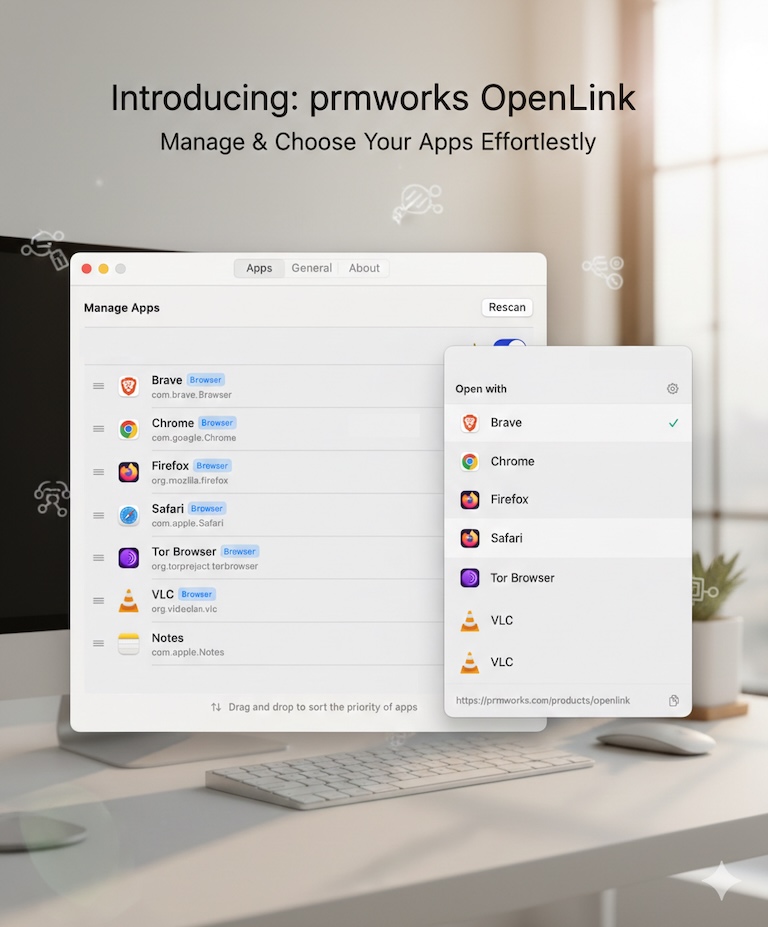
OpenLink - Smart Browser Picker for macOS
OpenLink is a native macOS application that gives you control over how web links open on your Mac. By registering as your default browser, it intercepts link clicks from any application and presents a lightweight picker, allowing you to choose the specific browser or app for that URL.
Why Use OpenLink?
We often use different browsers for different tasks. Chrome for development, Safari for personal browsing, or specific apps for certain links. macOS defaults to opening everything in one browser, forcing you to copy-paste links manually. OpenLink solves this by letting you decide on the fly, right at your cursor, streamlining your workflow and saving time.
Key Features
- Browser Picker Popup: A clean, native popup appears instantly at your cursor position when you click a link.
- App Discovery: Automatically scans your system to find all apps that can handle web links, including browsers and specialized tools.
- Smart Organization: Real browsers are prioritized at the top, and you can star your favorite for quick access.
- Full Customization: Hide apps you don’t use, and drag-and-drop to reorder the list to match your preference.
- Quick Actions: Easily copy the URL to your clipboard directly from the popup.
- System Integration: Supports Light and Dark mode, and integrates seamlessly with macOS as the default browser handler.
How It Works
- Intercept: When you click a link in Mail, Slack, or any other app, OpenLink catches the request.
- Select: A small window appears next to your mouse pointer, listing your available browsers.
- Launch: Click your desired browser (or press a shortcut), and the link opens immediately in that app.
User Interface & Options
OpenLink is designed to feel like a part of macOS:
- The Popup: Minimalist design showing the target URL and your list of apps.
- Settings Dashboard:
- Apps Tab: Manage visibility, favorites, and sorting order.
- General Tab: Configure startup behavior and default browser registration.
- Menu Bar: Quick access to settings and rescanning options.
Technical Details
OpenLink is built natively for macOS using modern Apple technologies:
- Language: Written entirely in Swift and SwiftUI for performance and safety.
- Core Integration: Uses AppKit and CoreServices to handle system-level URL events reliably.
- Lifecycle: Implements ServiceManagement for reliable “Launch at Login” functionality.
- Storage: User preferences are stored locally using
UserDefaults, ensuring fast access and privacy. - Sandboxing: Operates within macOS security constraints while maintaining necessary system integrations.
Privacy & Security
OpenLink is built with a privacy-first architecture:
- No Tracking: The app does not collect, store, or transmit any user data.
- No Network Requests: OpenLink never connects to the internet; it only passes URLs to your local apps.
- Local Processing: All logic happens on your machine. The URLs you click never leave your device until you send them to a browser.
System Requirements
- OS: macOS 14.0 (Sonoma) or later
- Architecture: Native support for both Apple Silicon (M-series) and Intel Macs
Get Started
Take control of your links today. Download OpenLink and set it as your default browser to experience a smarter way to browse on macOS.
OpenLink brings the flexibility of choice to every link you click. Stop juggling browsers and let OpenLink handle the routing for you.
Key Features
Smart Browser Picker
Intercepts HTTP/HTTPS links and shows a clean popup at your cursor to select the right browser for the task.
Automatic App Discovery
Instantly finds all installed applications capable of handling URLs without manual configuration.
Customizable Priorities
Drag and drop to reorder apps, set favorites, and hide unused apps to streamline your workflow.
Native Performance
Built with Swift and SwiftUI for a lightweight, fast, and seamless macOS experience.
Privacy Focused
No network requests, no tracking, and no data collection. Your browsing habits stay on your device.
Launch at Login
Optional auto-start ensures OpenLink is always ready to handle your links from the moment you log in.
Ready to build something?
Explore the live demonstration or dive into the codebase to see how it's built.